Our platform separates day-to-day WordPress requests from larger projects, making it easier to organize work and keep everyone focused on what needs to happen next.
TICKETS
Tickets for Ad-Hoc WordPress Support
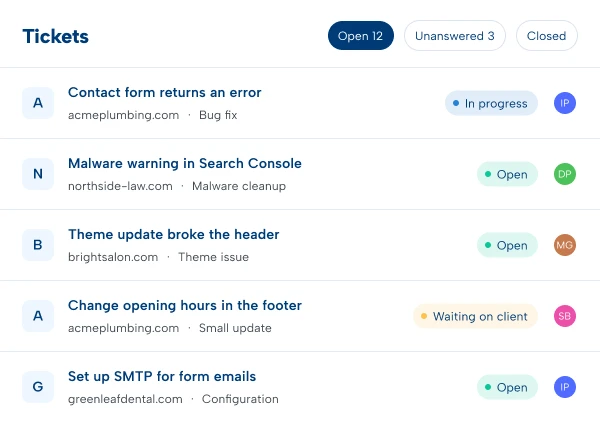
Tickets are designed for smaller, individual requests that need attention without creating an entire project. Use tickets for:
WordPress troubleshooting
Malware cleanup
Small website updates
Plugin or theme issues
Bug fixes
Configuration changes
General consultations
Other ad-hoc requests
Tickets are connected directly to the website they belong to, so the website, client and request stay organized within the same account.
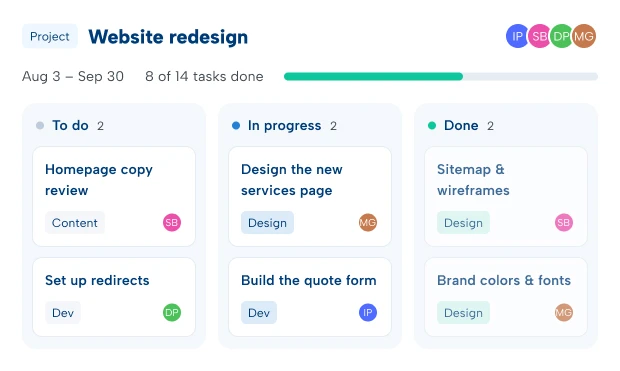
When the work involves multiple tasks, people and stages, create a project. Projects are ideal for:
Website development
Website redesigns
Landing page development
UI/UX design
Custom WordPress development
Larger design projects
A project acts as the central workspace where individual tasks can be created, organized and completed.
Inside every ticket & task
Everything You Need Inside Every Ticket and Task
Tickets and project tasks share a powerful set of tools, so your team doesn’t have to change the way it works depending on the type of request.
1
Keep the Details in One Place
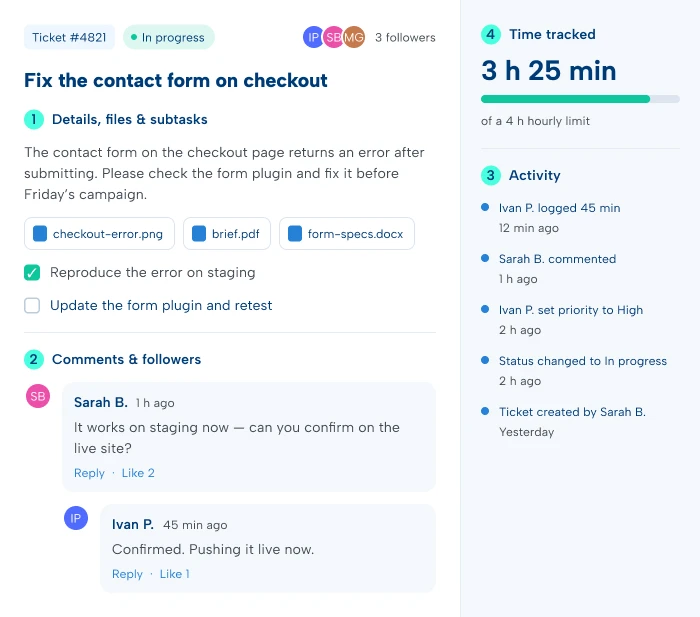
Add a clear title and description, upload designs, screenshots and documents, and break the work into subtasks or subtickets — without losing the context of the original request.
2
Communicate Where the Work Happens
Comment, reply to individual comments and like responses. Add or remove followers to control who stays involved — the conversation stays attached to the work.
3
See the Complete Activity Timeline
A chronological feed shows every change, comment, assignment and update from creation to completion — a clear record for both your team and ours.
4
Know Exactly How Much Time Was Spent
Tracked time is shown right inside tickets and tasks, so you see the time spent without switching apps or waiting for a separate report.
Learn More About Time Tracking →
Control How Work Gets Done
Every request comes with the controls needed to manage workload, expectations and delivery.
Assign the Right Person
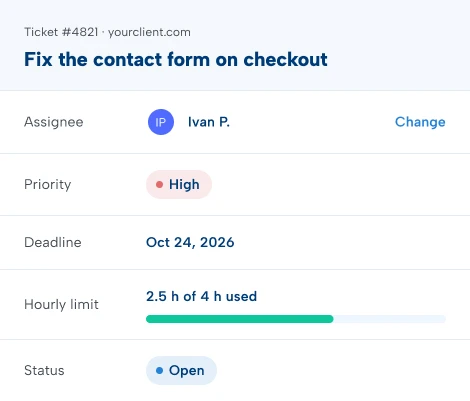
Assign tickets and tasks to the appropriate team member and change assignments whenever necessary.
Set Priorities
Define the priority level so urgent work can be identified and handled accordingly.
Set Deadlines
Add deadlines to keep time-sensitive work visible and projects moving forward.
Set Hourly Limits
Set an hourly limit before work begins to control how much time can be spent on a ticket or task.
Especially useful for agencies working within client budgets.
Flexible Enough When the Scope Changes
Sometimes a small request becomes something bigger. Sometimes a project task turns out to be a simple standalone request. You don’t have to start over.
Convert a ticket into a project task — or a task into a ticket. The work moves to the workflow that makes the most sense as its scope changes.
Share Work Without Losing Context
Need someone else to review a specific request? Share a direct link to a ticket or task — no screenshots, no copying information between systems.
Bring the right people into the conversation. Everything remains connected to the original work.
Projects
Projects Bring the Entire Team Together
Projects provide a dedicated workspace for larger engagements and organize all related tasks in one place. Add the people who actually need to participate in the project.
Webueno Team Members
Add developers, designers and other Webueno specialists involved in delivery.
Developer
Designer
SEO specialist
Client & Agency Team Members
Add members of your own organization, agency or client team who need access to the project.
Agency owner
Account manager
Client
Everyone involved can follow progress, while individual tasks remain clearly organized.
For agencies
Built for Agencies Managing Multiple Clients
When you’re responsible for dozens of websites, email and generic task-management tools quickly become difficult to manage. Our platform connects the work with the client, website, people, communication and tracked time behind it.
Your clients get an organized way to communicate and request work. Your agency gets visibility into what’s happening across its entire portfolio.
Everything connected
Work, client, website, people, communication and tracked time — in one place.
White-label client access
Manage your own requests and give clients access through a white-label experience.
Portfolio-wide visibility
See what’s happening across every client and website you manage.
One system
From a Five-Minute Fix to a Complete Website
One system can handle both.
01
Tickets
For individual, ad-hoc WordPress requests.
02
Projects & Tasks
When the work requires a larger, structured workflow.
03
Move between them
When the scope changes, simply move the work.
No scattered emails. No disconnected time logs. No wondering who needs to respond next.
Just one organized workflow from request to completion.
Trusted by Numerous Agencies and Businesses
See Ticketing & Project Management in Action
Explore how Webueno can help you organize WordPress support, client requests and larger projects from one platform.