


Every tracked hour is connected to the work behind it. Review time by team member, project, website, task or ticket — with activity details and screenshots available when you want to look deeper.
Time tracking shouldn’t live in a separate system disconnected from the work you’re paying for. Ours is built directly into Webueno’s ticketing and project management — when a team member works on a task or ticket, their time is connected to that specific piece of work.

Get a complete overview of how your WordPress support hours are being used across your account. The most important numbers sit at the top of your dashboard.
Sep 1 – Sep 30
The total time recorded through the Webueno time tracking application for the selected period.
Kept separate
Time that was added manually, clearly distinguished from automatically tracked time.
per credit
Your average price per credit, based on the credits you’ve purchased and the discounts applied.
1 credit = 1 hour of WordPress support, so this is your effective support cost.
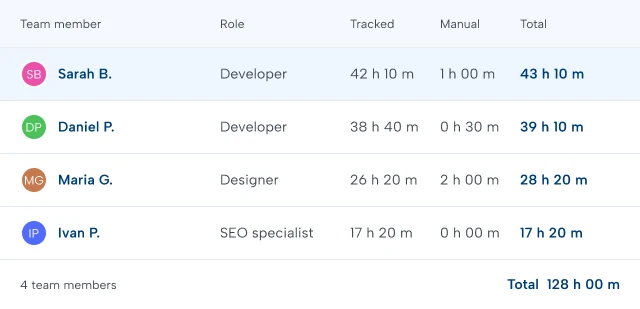
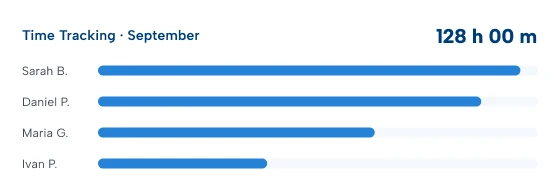
The overview breaks down the Webueno team members who have worked on your account. Instead of one combined number at the end of the month, you see who worked on your account and how much time they contributed.
Select any team member to explore their work in greater detail.
When you’re managing multiple websites and projects, a single total doesn’t tell the whole story. Use filters to find exactly what you’re looking for.

Review hours for a specific day, week, month or custom period.

See the work and hours associated with a particular Webueno team member.

Filter tracked time by project and drill down into the individual tasks within it.

Select a website to see the support tickets and tracked time for that site.
Combine filters to investigate a particular project, website, team member or period without searching through unrelated activity.
The Time Tracking dashboard gives you the big picture. When you need more detail, simply drill down.
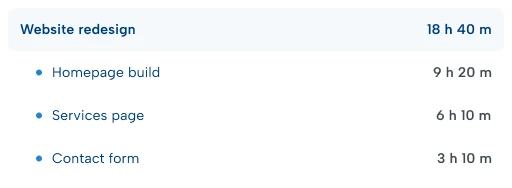
See every project the team member worked on, with the individual tasks inside each project and the time associated with them.
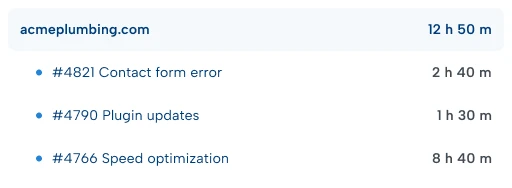
See the websites they supported, the tickets associated with each website and the hours spent on those requests.
From there, select an individual task or ticket to see the actual tracked activity.
Sometimes knowing that three hours were spent on a task is enough. Sometimes you want to know more. Open the tracked time for any task or ticket to see the work broken down hour by hour.
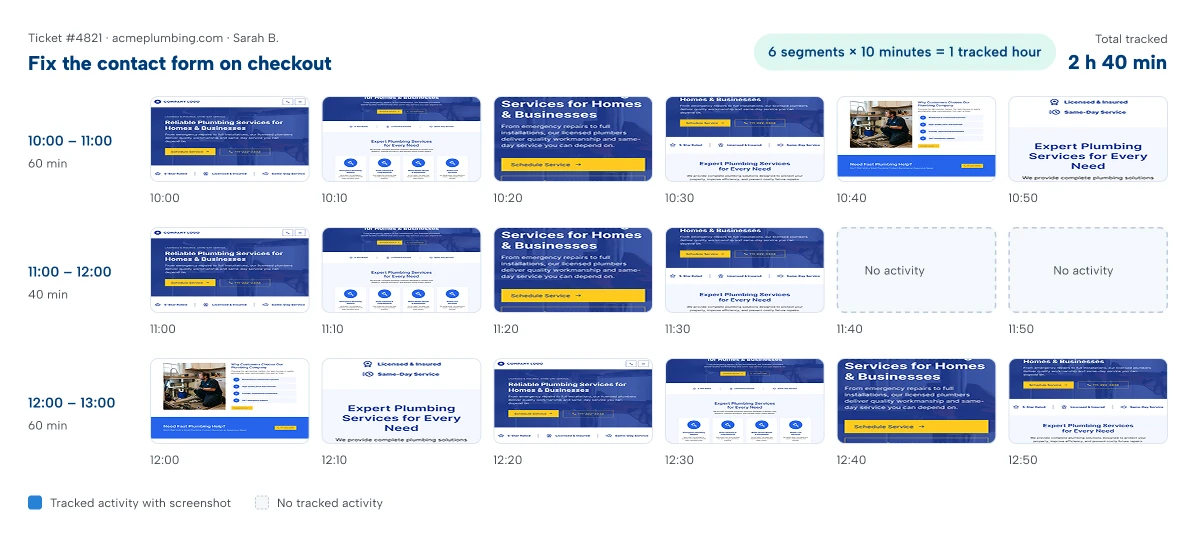
Each hour is divided into six 10-minute segments. A segment with tracked activity shows a screenshot captured from the team member’s screen during that period.
A period without tracked activity stays blank, so you understand how the hour was recorded at a glance.
You don’t just see the total. You can see the activity behind the time.
Our team uses a time tracking application built specifically for the Webueno platform. When a team member starts working, it records their time and periodically captures a screenshot of their screen.
Review the screenshots whenever you need context — a transparent record connecting time, activity and completed work.
People make mistakes. Someone may forget to stop a timer or accidentally track time against the wrong request.

Team members can remove incorrectly captured screenshots and tracked segments, keeping recorded time aligned with the work actually performed.
You don’t always need to visit the main Time Tracking dashboard. Time information is also available directly within individual tickets and project tasks, so you can see the time behind a request without leaving the context of the work.
For deeper analysis, the dedicated Time Tracking section gives you the account-wide view.
Same data. Presented at the level that makes sense for what you’re doing.
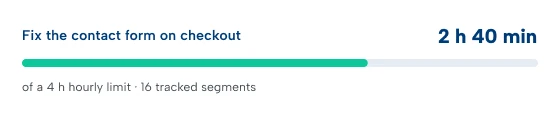
WordPress support on Webueno uses credits. As our team works, tracked time determines how those support hours are used — connecting your wallet directly to actual work.
Understand costs across different clients, websites and projects.
A clear picture of exactly what you’re paying for.
When you’re outsourcing work for your clients, visibility matters even more. You need to know what’s happening without having to manage every developer or designer directly.
Webueno gives agencies a structured record of every request — so you can scale your delivery capacity while keeping visibility over the work being performed.
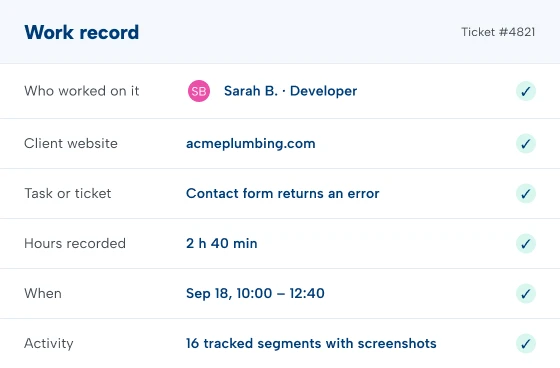
A client submits a ticket.
Or your agency creates a project.
A task is assigned.
A Webueno team member starts working.
Time is tracked.
Screenshots document the activity.
Credits are used based on the recorded time.
And everything remains connected to the original request.
That’s what makes Webueno time tracking different:





Explore how Webueno can help you organize WordPress support, client requests and larger projects from one platform.
